
Your challenge
Your morning search should not create an afternoon of administration.
You open LinkedIn or Indeed over coffee. One role looks promising. Another needs a closer look. You copy URLs into a spreadsheet, download job descriptions, and add notes to a Word document about whether to pursue or investigate each one.
Before long, you have forty tabs open. Closing one feels risky: will you lose an opportunity, forget why you saved it, or have to find the posting again? Leaving them open means carrying the whole unfinished search in your browser.
For a senior professional, each role can raise a different question about scope, leadership responsibility, location, or the evidence in your résumé. Recording the link is only the beginning. You still need to decide whether the opportunity deserves more of your time.
The Resume RedTeam approach
Find it. Capture it. Triage it. Keep browsing.
With the extension installed and your résumé selected, you can keep your usual browsing routine. Capture and triage happen as you find opportunities.
- Open a posting that interests you. Browse LinkedIn, Indeed, or a company’s careers site in your supported browser.
- Click Save & Triage. The extension captures the job posting and its URL and starts the initial assessment. The posting, source, and analysis stay together.
- Continue looking for opportunities. Return to the saved jobs and their triage results when you are ready to compare them. You can decide to pursue a role, investigate an open question, or set it aside.
- Send a promising role to full résumé review. Another click moves the selected opportunity into the deeper review against your résumé.
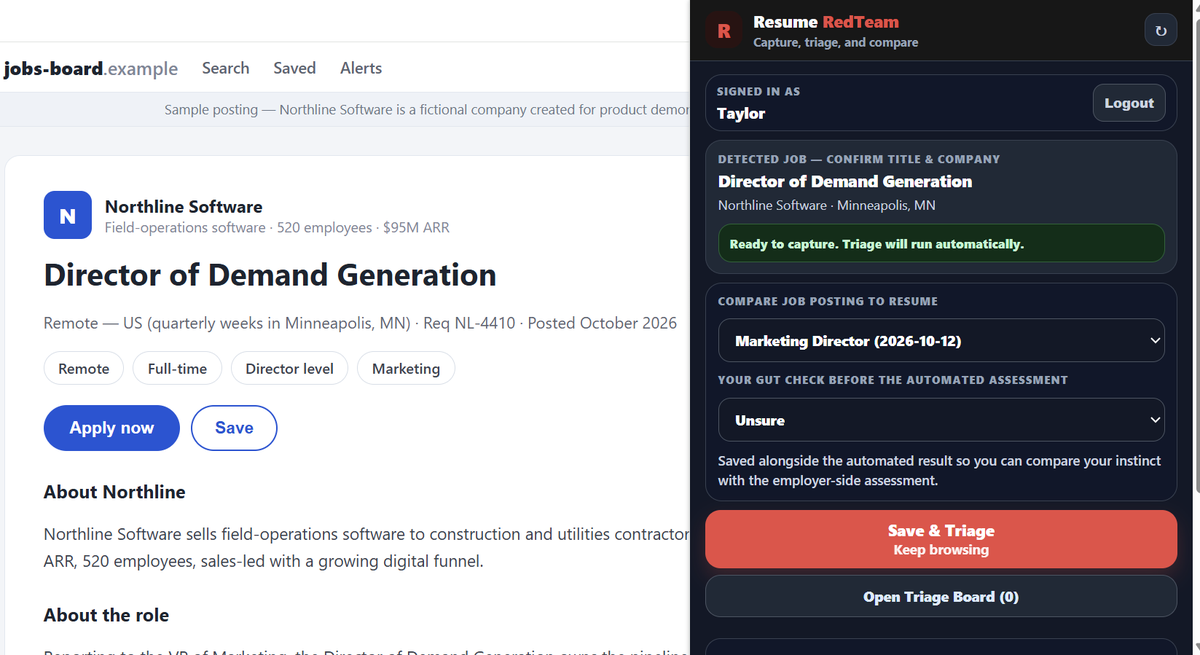
What is the difference between triage and a full résumé review?
Triage helps you decide what deserves a closer look. Inspect the initial assessment and any concern that could change your interest. Full résumé review is the next step when you want a deeper examination of the application’s evidence and the questions an employer may raise.
You choose when to take that next step. An assessment can miss context; use it to focus your attention and examine the reasoning.
A morning search · Illustrative workflow
Coffee, a few postings, and a clearer next move.
You find an operations role on LinkedIn, capture it, and keep browsing. An Indeed posting catches your attention next. You save and triage that one too, without creating another document or spreadsheet row.
When you return to your saved opportunities, one role has a location question to investigate. Another appears worth a deeper review. You send that role to full résumé review with another click. The posting, URL, and initial analysis are already there when you pick up the work.
Can I capture and triage jobs on my phone?
Yes. Use Safari on iPhone, or Firefox on Android, with the Resume RedTeam extension installed. Browse the posting in that browser, capture it, and continue your search. You can return to the saved opportunity when you have time to examine it.
| Where you browse | Supported browsers |
|---|---|
| Desktop | Chrome, Edge, and Firefox; Safari on Mac. |
| iPhone | Safari on iOS. |
| Android phone | Firefox on Android. |
You can also upload or paste a job posting into triage. Those entry points remain available when you are working from a saved description or prefer to add the posting directly.
Capture gives you the posting and source. Triage gives you an initial assessment. Your decision determines what happens next. See capture and triage in the connected workflow →
Benefits to you
Finish the morning with decisions you can act on.
- Less copying and downloading. Capture the posting and URL together instead of building a separate trail of files and links.
- Less context to reconstruct. Return to the opportunity and its initial analysis without reopening every job site to remember what interested you.
- More deliberate use of your time. Decide which roles need investigation and which deserve full résumé review before investing in a tailored application.
- A routine that works on your phone. Capture during a morning browse in a supported mobile browser, then examine the saved opportunities when you are ready.
Once you have chosen the roles to pursue, use the organization and prioritization guide to keep contacts, materials, commitments, and next actions connected.
Your alternatives
What if you already have a way to save jobs?
Bookmarks, spreadsheets, and documents
These can support a selective search if you maintain them consistently. Keep the actual posting, its URL, your assessment, and the next action easy to find. You will need to make and record the initial fit decision yourself.
An existing job tracker
You may already use a tool that saves postings and offers analysis. Compare the actual workflow: can you capture where you browse, inspect an assessment, and carry the same opportunity into deeper review? Consider how much information you need to move between tools.
Upload or paste directly into triage
This works when you already have a job description or are not using the extension. Add the posting directly and use triage to decide what deserves further work.
Put the guide to work.
On your next morning search, capture the postings that interest you. Return to their triage results, identify the questions to resolve, and choose which opportunity to send to full résumé review.
Explore the product workflow
This guide describes the Resume RedTeam capture and triage workflow. The example is illustrative. Triage and full review support your judgment; neither is an employer’s hiring decision.